Features / LIVE
See where the dealer book stands, strike by strike, every second.
FirmTape rebuilds the SPX dealer gamma book from every options print while the session trades. The flip, the walls and the strikes that keep standing out are drawn on the chart beside a ladder of every strike, in three books. Alerts watch the levels for you, ASK answers from the same numbers, and the levels follow you into your own platform.
LIVE: today's session every second, alerts, ASK, the levels API and the platform integrations, and 5 LAB credits a month. Every finished session is free in REPLAY.
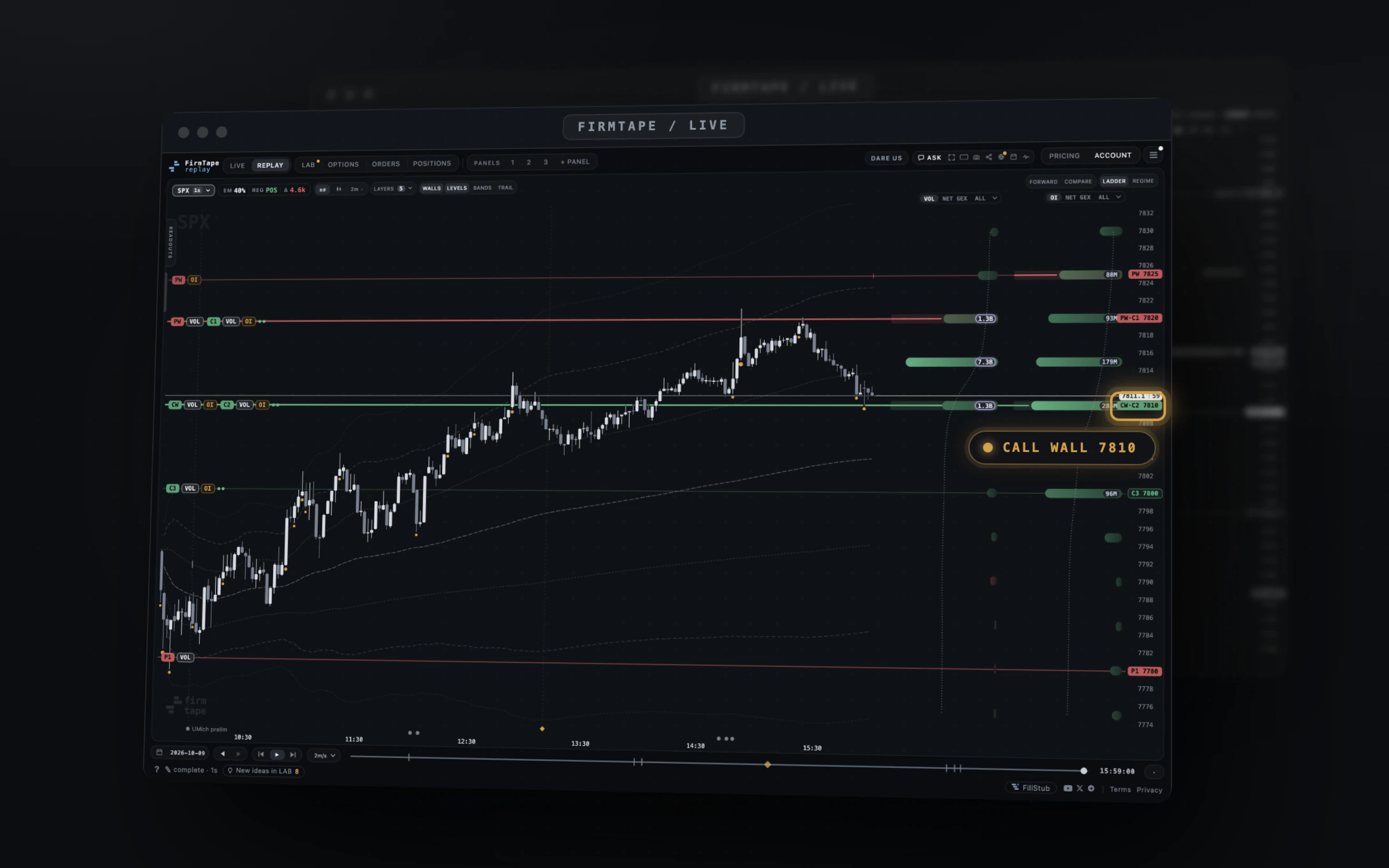
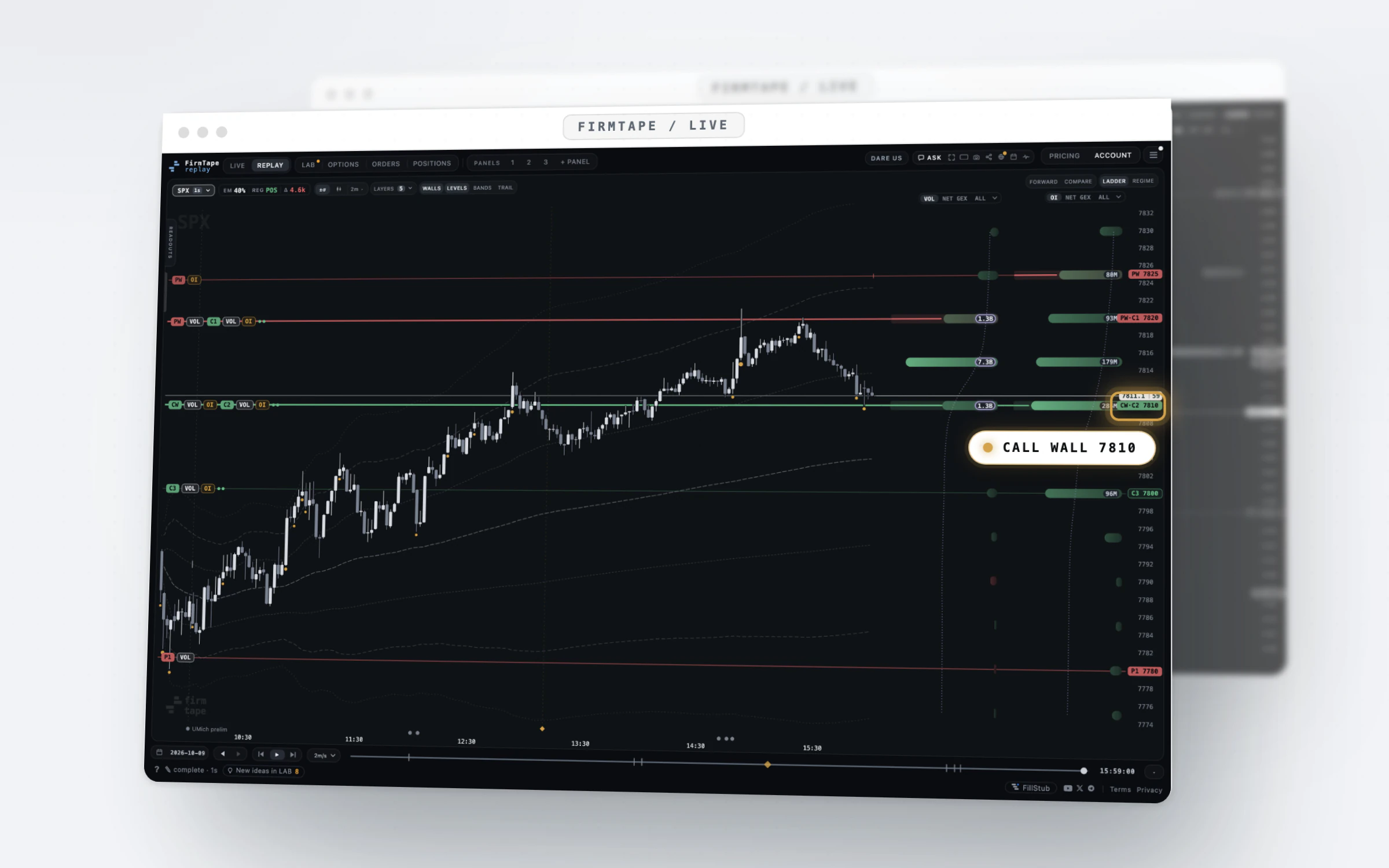
The problem
A gamma level printed once a morning is stale by the first hour.
- The flip and the walls move as the day trades, and a number from the close says nothing about where they sit at 11:00.
- A level only helps if you are looking when price gets there, and nobody watches four symbols all session.
- A level without its size, its distance and its book is a line you cannot weigh, and copying it by hand into another platform makes it stale again.
With LIVE
The book, rebuilt every second, watched for you, wherever you chart.
LIVE measures the SPX book from the tape itself, once a second, in three books. Every wall and level is drawn with its weight, its distance from price and the moment it came in. A line on any level fires to Telegram, your phone or your server; ASK reads the minute on screen in plain words; the OPTIONS tester puts a structure against the same book; and the same flip and walls refresh themselves in your platform.
How it works
Step by step
-
01 / 04
Draw the walls and levels
WALLS puts each book's call wall and put wall across the chart; LEVELS adds the strikes that keep standing out. Every line is named at its left end and plated on the price scale, its width the share of the book it carries.
Read more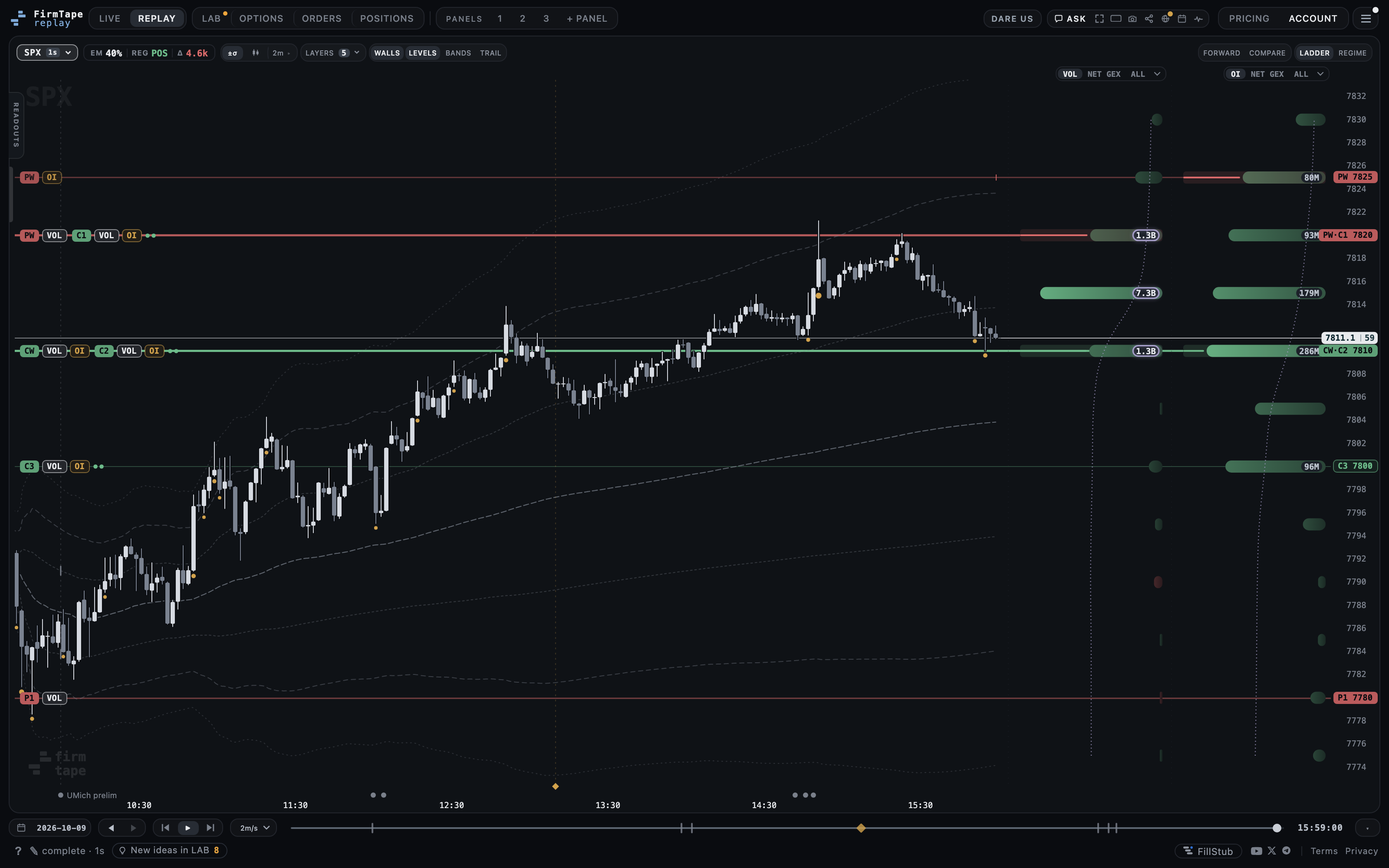
-
02 / 04
Read the ladder in any book
Click a ladder column's head. Its card picks the book (VOL, OI, MEAS), the expiry, the metric and the window, so you see the gamma on every strike, level with its price.
In the guide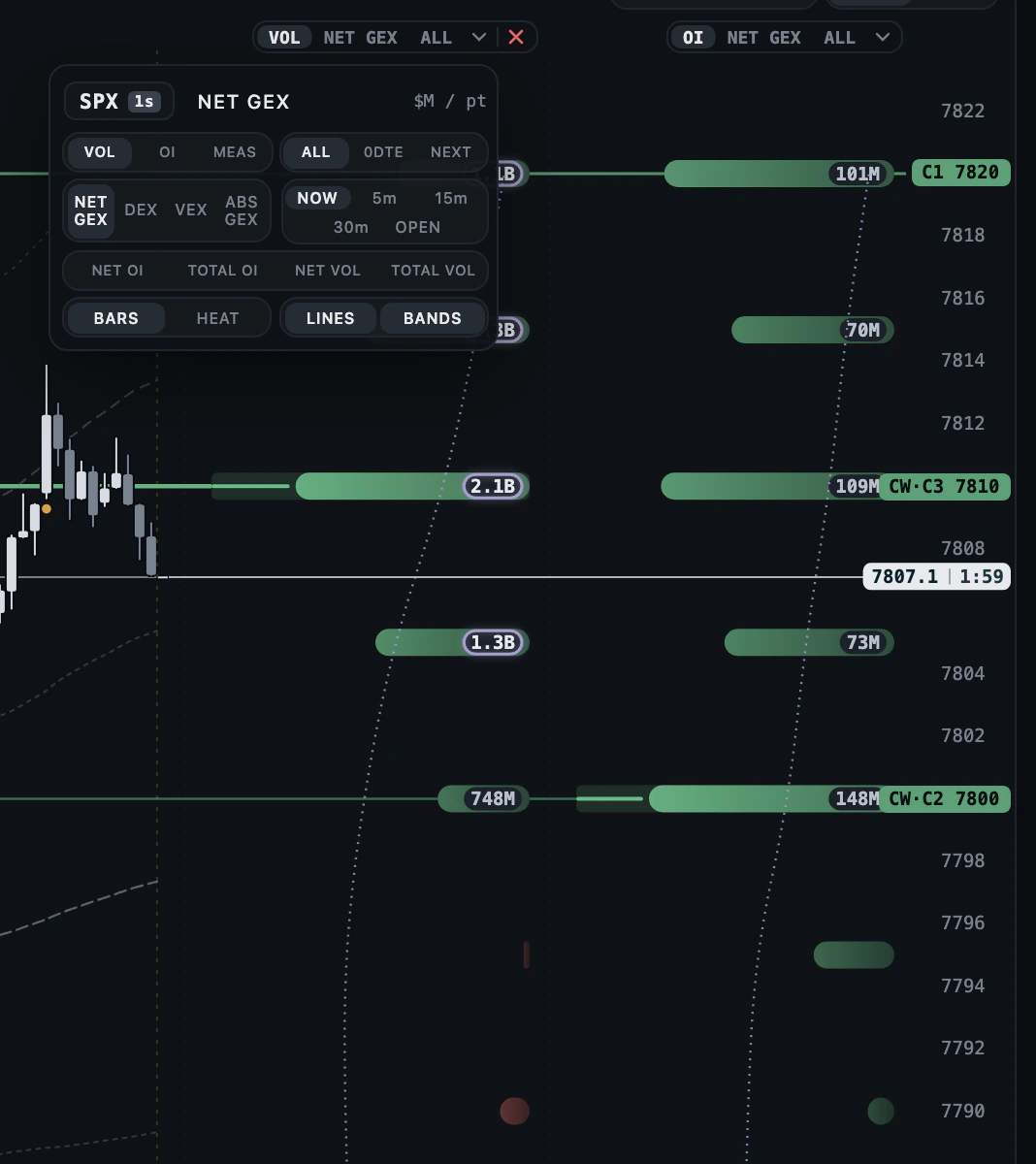
-
03 / 04
Put an alert on a level
Right-click near a wall or the flip and pick Alert when price reaches that level. The line follows it as the book moves and fires to Telegram, your phone or your webhook.
Read more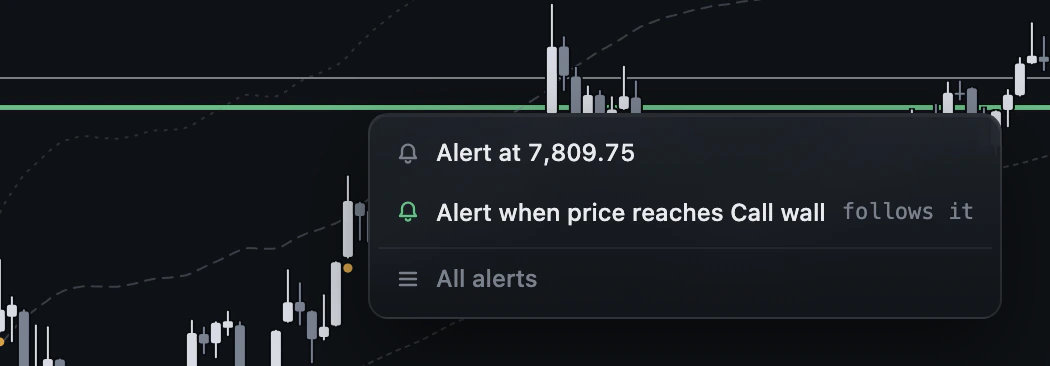
-
04 / 04
Ask about the screen
Press ASK (Cmd+\) and type
In the guide/levelsor a question in plain words. It reads the symbol, the day and the minute on screen and answers from these same numbers, with the levels it cites as cards.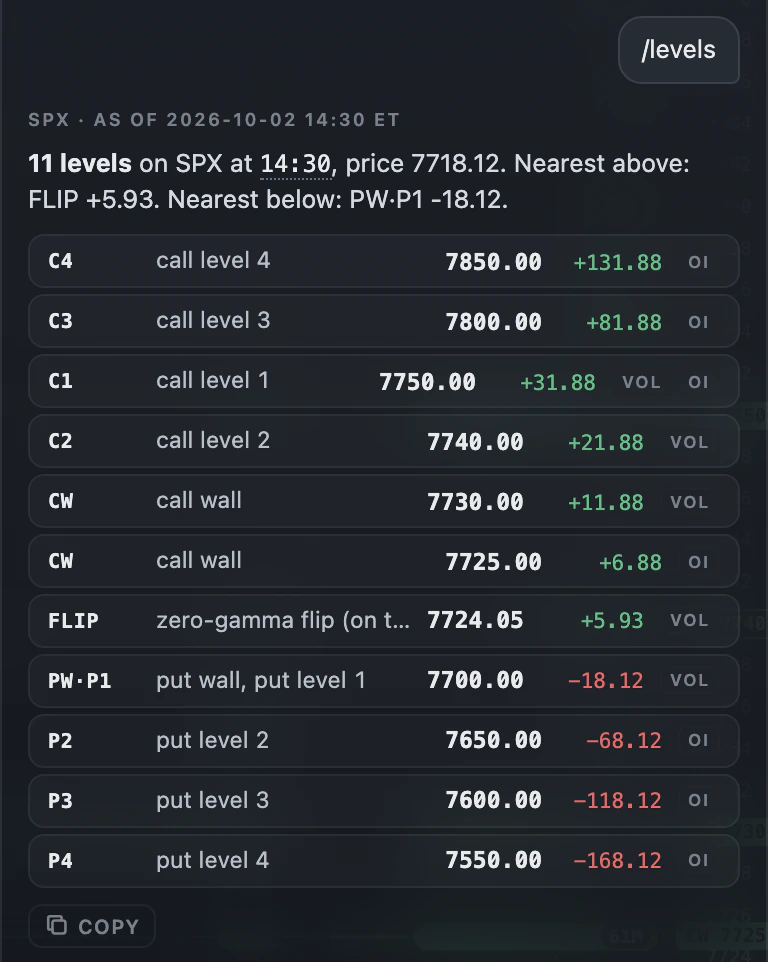
Capabilities
What you can do with LIVE
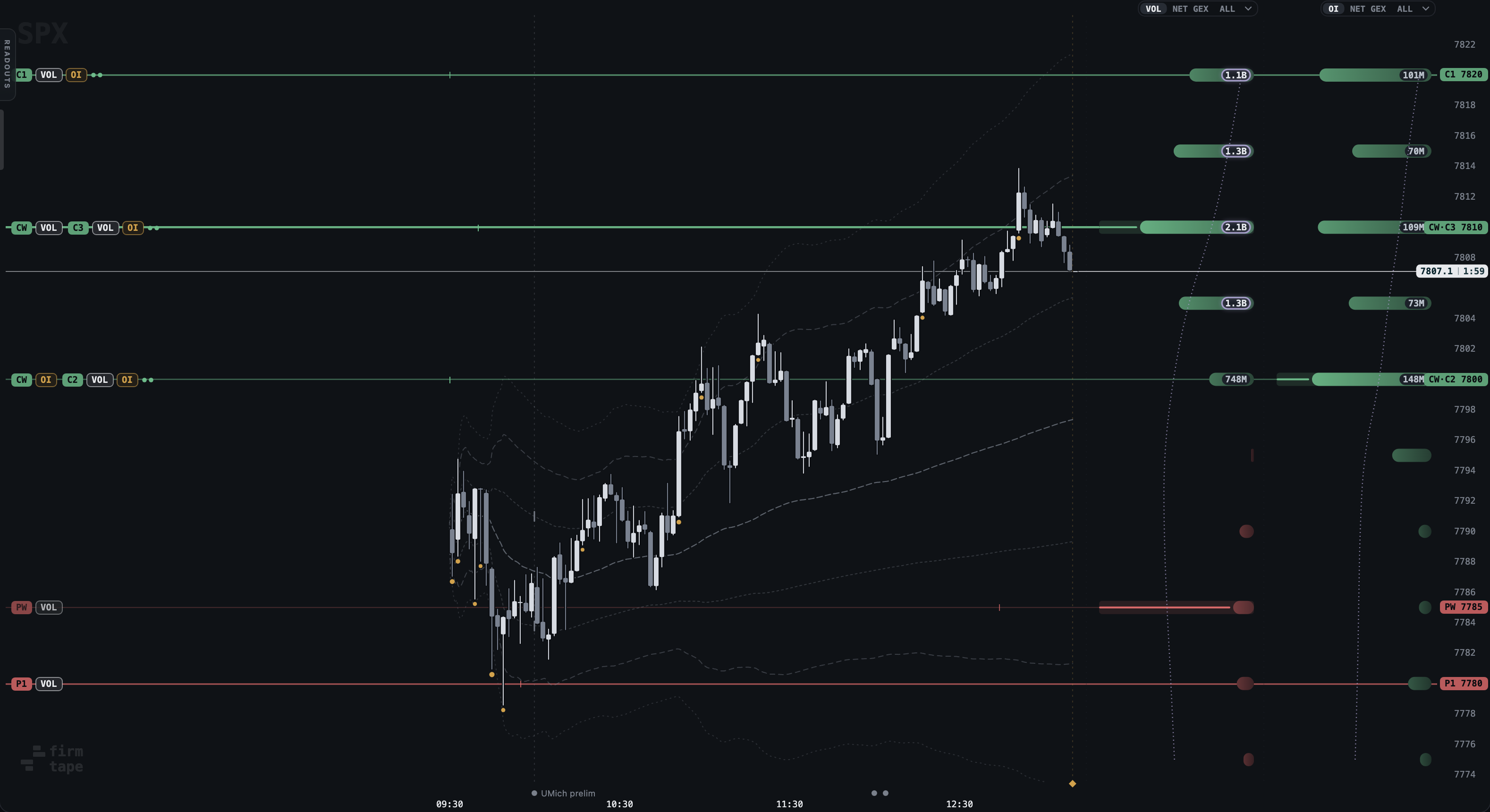
Walls and levels that carry their weight
Width is the strike's share of the book, fade is its distance, and a tick marks when it came in.
Read more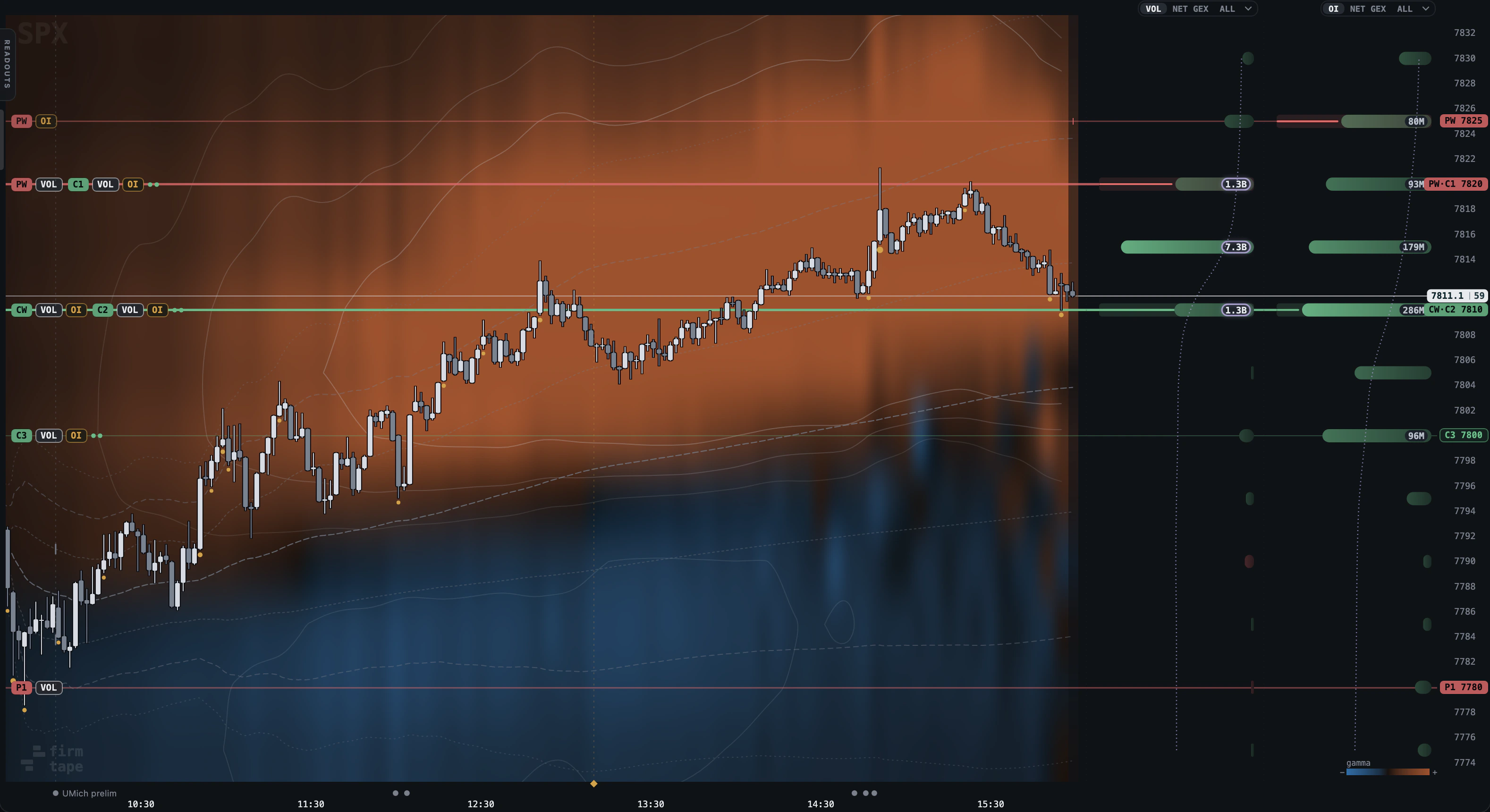

Alerts on Telegram and your phone
A level line or a watchlist event, as a message from @FirmTapeBot, a notification from the installed app, or a signed webhook.
In the guideASK beside the chart
The levels on screen, the session's orders, the day's events and a level's week, in plain words, from the minute you are looking at.
In the guide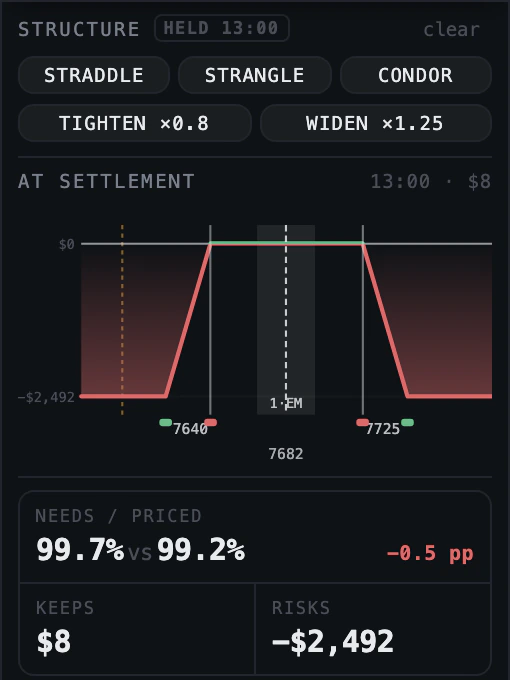
A structure against the book
Build a condor or a strangle on the ladder and read its payoff, its breakevens and where its short strikes sit against the walls. Free to read.
In the guide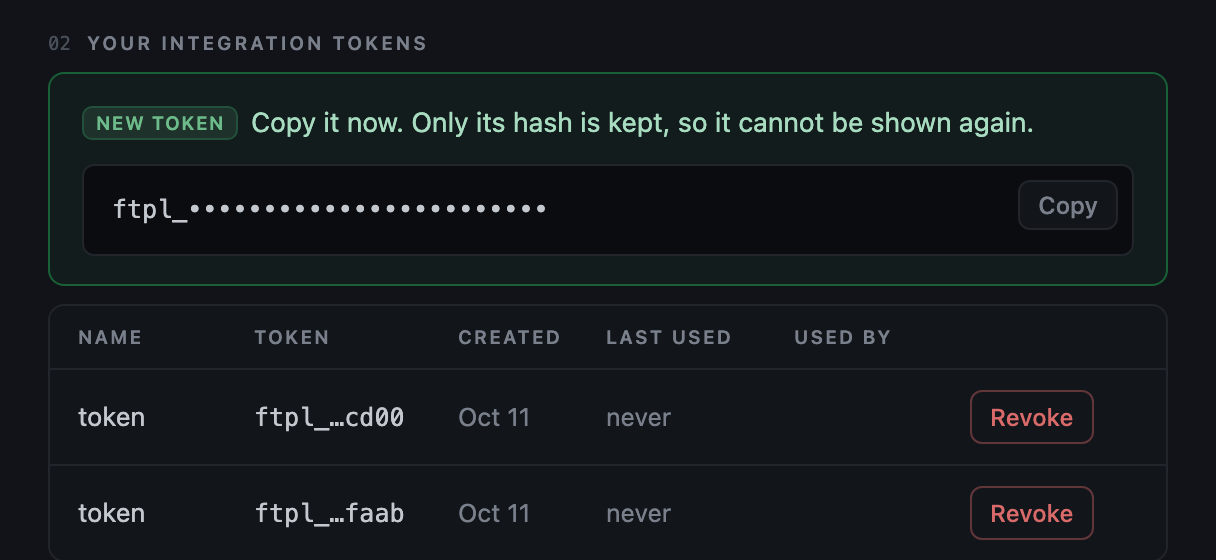
The levels in your platform
The flip and the walls on the chart you already trade from, refreshed by themselves, with a read-only token.
In the guideEvery feature
Everything in LIVE
54 features · 11 groups. Each one is written up in the LIVE guide.
Read the book 9
- The chart at a glanceRead the book and price together by keeping candles, walls, levels and the ladder on one price scale.
- LIVE and REPLAYSwitch between today's session and any finished day with the two modes at the top left.
- Candles, period and candle typeSet how price is drawn by picking a candle type and a period on the chart bar.
- Ladder columnsSee the gamma on every strike beside the chart by opening up to three ladder columns, each its own book and metric.
- The three booksKnow which book a number comes from by reading the VOL, OI or MEAS chip on every line and column.
- Header chip and REGIMERead the expected move used, the regime and the largest book change at a glance from the chip beside the symbol.
- The expected moveSize the day against what the market charges for it by reading the expected move used so far.
- READOUTS drawerRead every number of the minute on screen by opening the READOUTS drawer on the chart's left edge.
See the walls 5
- Walls and levelsSee the strikes the dealer book leans on, drawn across the chart with their weight, by turning on WALLS and LEVELS.
- Level cardAnswer one level's questions (distance, size, touch odds, age) by clicking its chips.
- Session levelsDraw the prior day, opening range, premarket, overnight range, prior week and month to date as thin lines from LAYERS.
- TRAILSee where the levels have been all day by turning on TRAIL behind each level line.
- ±σ band and event marksFrame price against its own session by drawing the VWAP with one, two and three deviations, plus marks at each release.
Map the surface 9
- LAYERSPut anything over the candles from one popover: session levels, books, overlays, heatmaps, indicators and orders.
- Heatmap: GAMMA, VANNA, CHARMSee where the book sat all session by painting gamma, vanna or charm behind the candles, strike by minute.
- VOL DOTS and VOL BARSMark the session's busiest candles by turning on VOL DOTS, or draw contracts per candle with VOL BARS.
- ΔΓ overlaySee the net gamma put on while each candle formed by cycling the ΔΓ overlay.
- SMILERead implied vol across strikes on the ladder's axis by turning on SMILE.
- CVDTotal calls minus puts per bar from the open by adding the CVD band under the chart.
- Research overlays: RV/IV and 25Δ·HICompare the move the market paid for with the one it got by drawing RV/IV under the chart.
- FORWARDCarry the book on screen into the empty half of the chart by turning on FORWARD.
- COMPARELay up to three other symbols' paths on this chart's scale by adding them in COMPARE.
Before the bell 1
- PREMARKETRead where the market stands before 09:30 and how far it is from yesterday's levels in the PREMARKET drawer.
Lay it out 5
- PANELSDock strike ladders of any symbol beside the chart by pressing PANELS 1, 2 or 3.
- Chart layoutsWatch several charts on one clock by picking a layout or a preset from the layout icon.
- Symbol pickerOpen SPX, a future or 123 tickers by clicking the symbol chip or just typing.
- Futures views: ES, NQ, RTY, GC, SI, ZB, CLRead the index book at the future's price by picking ES, NQ or RTY under FUTURES.
- Focus modeGive the chart the whole window with the focus icon.
Tell us what to build 1
- DARE USAsk for the view you trade by writing it in DARE US on the toolbar.
Alerts and delivery 9
- Alert linesPut an alert on any price or on a level that moves by right-clicking the chart, a level or a ladder strike.
- Would-be fires on a replaySee when a line would have fired on any finished day by opening that session in replay.
- Level alerts on a watchlistHave the flip, the walls and the regime watched on up to twenty symbols by picking the events under Account, Level alerts.
- The list of your alert linesReview every line on every symbol in one place by opening Account, Level alerts.
- Where alerts goSend every alert to Telegram, your phone and your own server by setting them once under Account, Level alerts.
- Telegram: @FirmTapeBot and the channelGet your alerts and ask for levels in a chat by linking @FirmTapeBot in one tap.
- Notifications on your phoneGet alerts as phone notifications by installing the terminal as a web app and turning on push.
- WebhooksWire alerts into your own bot or journal by pasting one https address that receives a signed JSON POST.
- Morning levels mailStart the day with the flip, the walls and the expected move by keeping the morning mail on.
ASK, the assistant beside the chart 5
- The ASK drawerAsk about the chart in plain words by pressing ASK on the toolbar.
- Slash commandsGet the levels, the largest orders or the events at once by typing / and a command.
- /levels and answer cardsSee every level on screen with its distance from price by typing /levels.
- Screen context and /contextSee exactly what ASK knows about your screen by typing /context.
- Free questions and answersAsk anything about the session in your own words and get a short reading with the levels and orders it cites.
OPTIONS, the structure tester 5
- The structure testerBuild an SPX 0DTE structure by clicking strikes on the gamma ladder or picking a straddle, strangle or condor.
- Open an order in OPTIONSStudy a real order's structure by pressing OPT on its row in ORDERS.
- Payoff, needs and pricedKnow what a structure has to win by reading NEEDS vs PRICED beside its payoff at settlement.
- Against the bookSee whether a short strike sits under a wall or past the flip by reading the structure against the measured book.
- The archive runFind out whether a geometry ever paid by running it 63 ways over the archive for 10 credits.
Levels in your platform and your code 3
- Platform integrationsDraw the flip, the walls and gamma by strike on your own platform's chart by installing its FirmTape plugin.
- Integration tokensGive each platform or machine its own read-only key by creating integration tokens under Account, Integrations.
- Levels APIRead the flip, the walls and net gamma as JSON from your own script with an integration token.
Your own marks 2
- Notes on a minuteKeep your own reading of a moment by writing a private note on the cursor's minute.
- Bracket: sketch a structure against the bookSketch an entry with a stop and a target on the chart and see how far each line sits from the walls and the flip, and where the chain prices the close.
What it gives you
Why it is worth a place on your screen
Three books, side by side
The volume book most screens show, the open-interest book, and a measured book signed print by print from the tape that disagrees with the convention about the regime in 43% of minutes.
Levels that come to you
Alert lines that follow a wall, a watchlist of twenty symbols, the morning levels mail, and the same flip and walls inside the platform you already trade from.
Everything in one screen
Chart, ladder, heatmaps, readouts, layouts of up to four charts and twelve ladder panels, for SPX, ES, NQ, RTY and 123 tickers, with ASK beside it.
LIVE: today's session every second, alerts, ASK, the levels API and the platform integrations, and 5 LAB credits a month. Every finished session is free in REPLAY. Plans and prices.
Works with
LIVE with the rest of FirmTape
ORDERS
The session's largest orders sit on the same chart, placed against the book at the minute they printed.
LAB
A rule tested in LAB draws on the LIVE chart and rings when it triggers; LIVE includes 5 LAB credits a month.
REPLAY
Every finished session plays back on this same chart, minute by minute, free.
FAQ
Questions about LIVE
- Does LIVE tell me which way SPX will go?
- No. Direction was tested three ways on this data and is not there. LIVE measures where the book stands and how far price may travel; it never says which way to face.
- What is the difference between the three books?
- The volume book is built from the day's 0DTE volume, the conventional public object. The open-interest book uses yesterday's positions over four expiries. The measured book signs every print against the prevailing quote, a read no public feed offers.
- How often is the book rebuilt?
- SPX every second during the session. About a hundred more tickers are read from whole-chain snapshots every five minutes, and the chart says which cadence a symbol has.
- What do the alerts send?
- The price, the time in New York, the flip and both walls of the book at that second, and the book it read, to Telegram, a phone notification or your webhook. Never a trade call.
- Is ASK included?
- Yes. ASK is included in every paid plan, fifty questions a day; the slash commands other than /history answer without spending one.
- Does the OPTIONS tester cost extra?
- Building and reading a structure is free. Testing it over the archive spends 10 LAB credits, and LIVE includes 5 LAB credits a month.
- Can I see the levels in my own platform?
- Yes. The levels API and the platform integrations are part of LIVE: make a read-only token under Account, Integrations.
- What is free?
- Every finished session, with the same chart and every layer, in REPLAY. LIVE is today's session as it trades, and what is built on it.
What it does not do
- It does not draw entry arrows or trade calls, in the chart, an alert, an ASK answer or the tester: there is nothing honest to put in them.
- It does not claim a wall holds or breaks: whether price is drawn to strength has not been measured.
- It does not alert on the premarket estimate or on the side of a print, and it does not run outside the regular session.
See where the dealer book stands, strike by strike, every second.
The SPX dealer book every second, with alerts, ASK, the structure tester and the levels in your own platform