Features / REPLAY / MCP server
Give your AI assistant the dealer book, session by session.
Add one address and your assistant can read every finished SPX session: the flip, the walls, how they moved over a week, a ticker's latest book and the market calendar. Sign in and it can compile and backtest an idea in LAB without leaving the conversation.
Free tools need no account and no key; LAB tools need a sign-in or a Lab token and spend LAB credits.
Open a sessionIn the REPLAY guide
Why: ask your assistant about dealer positioning and get answers built on measurements, not on what it remembers. Where: the address and the connect steps are on MCP.
How to use it
- Add the server's address from MCP to your assistant as a remote MCP server.
- Ask about a session, a level or a week: the assistant calls the free tools.
- To backtest from the assistant, sign in when it asks, or give it a Lab token.
How to read it
- A ticker's book comes from five-minute chain snapshots with a trust grade; it is not a tape-signed book.
What it measures
Only derived per-session measurements cross the interface, one session per call: the levels, the regime, the percentiles and the events. Nothing on it is a trade call.
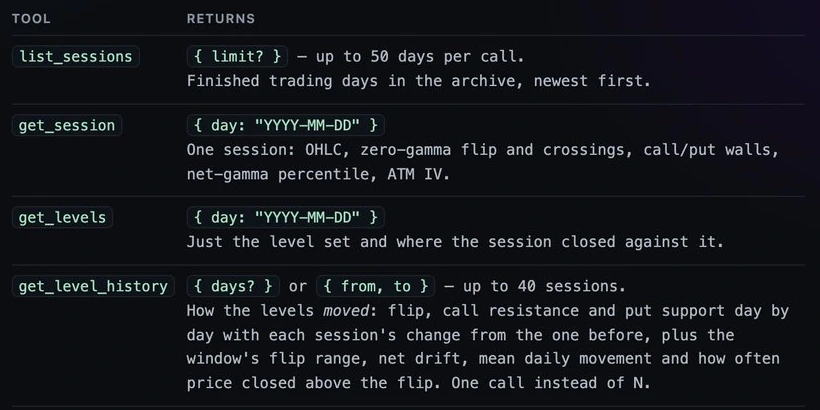
| Tool | What it answers |
|---|---|
| list_sessions | The finished trading days in the archive, newest first |
| get_session | One session: open, high, low, close, the flip and its crossings, the walls, the gamma percentile, ATM IV |
| get_levels | The level set of a day and where the session closed against it |
| get_level_history | How the flip and the walls moved over up to 40 sessions |
| get_symbol_gamma | The latest book of a ticker other than SPX, or of ES and NQ |
| get_events | The market calendar for a window, with what usually followed each kind of event |
| get_gex_profile | Gamma by strike of a session |
| screen_sessions | Filters and counts sessions across the archive |
Limits
One session per call. LAB tools spend the same credits as the terminal. The tool list and the connect steps for each assistant are on MCP.
Related
- REPLAY
- REPLAY: Pages for AI assistants
- LAB: The LAB desk and the backtest
- REPLAY: The session archive and session pages
Questions
- Does it cost anything?
- The free tools need no account and no key. LAB tools need a sign-in or a Lab token and spend LAB credits.
- Which assistants can connect?
- Any client that speaks the Model Context Protocol to a remote server. The connect steps are on the MCP page.
- Can it read today's live book?
- No. It reads finished sessions and the latest ticker books; the live stream is the terminal.
- Will the assistant give trade calls from it?
- The server returns measurements only. What an assistant says with them is its own; FirmTape sends no side and no forecast.