Features / ORDERS / POSITIONS panel and editor
Your short strikes, read against the book every minute.
Type the strikes of an iron condor, a strangle or a spread. POSITIONS reads each short side at every minute against the market minute, counts how many of your conditions are on, and tells you when that count changes, on Telegram, by email or to your webhook.
Free signed in on finished sessions; the live day with the ORDERS plan.
Open the ledgerIn the ORDERS guide
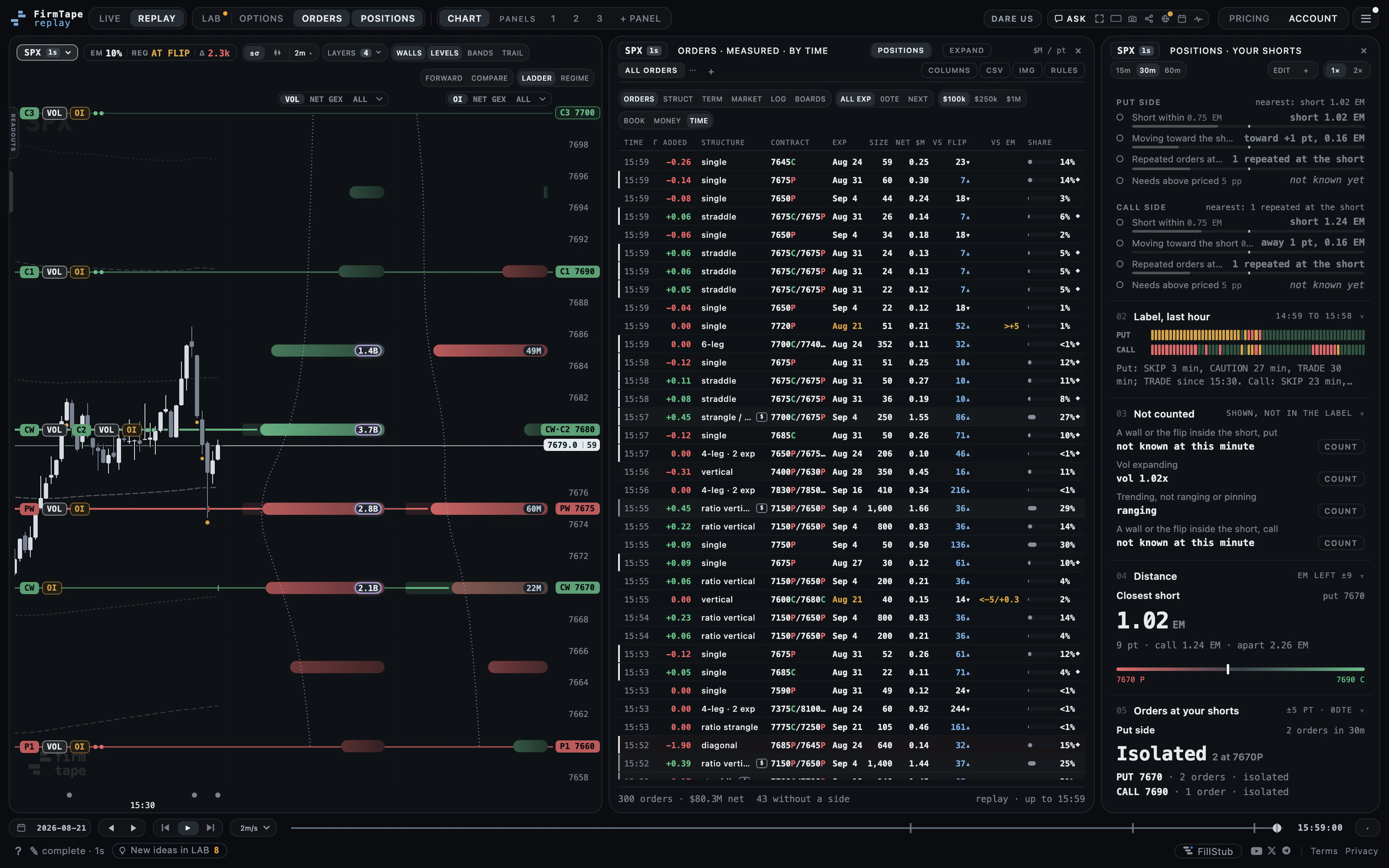
Why: your shorts read against the market minute, side by side, with the large orders at your strikes one panel away. Where: POSITIONS on the toolbar (ORDERS opens with it), then + or EDIT.
How to use it
- Press POSITIONS on the toolbar, then + for a new position or EDIT for the one shown.
- Pick a structure: IRON CONDOR, STRANGLE, PUT SPREAD or CALL SPREAD.
- Set the strikes with 1 EM OUT, LAST USED or TYPE STRIKES (low to high); the line under them gives each short's distance from spot in expected moves.
- Set ENTRY (between 09:30 and 16:00) and ALERT FROM, and where the alerts go.
- Switch your conditions on or off with their thresholds, then SAVE POSITION.
- Read each side's label and its reason; 15m, 30m and 60m set the window the orders near your shorts are counted in, 1x and 2x the panel's width.
How to read it
- A label is a count of your own conditions, at the threshold you chose. It is not a forecast and not an instruction.
- The reason names the conditions that are on, and the one that is off but nearest its threshold.
- A condition whose input is not known at that minute reads not known yet and never counts.
Settings and controls
| Control | What it does |
|---|---|
| IRON CONDOR / STRANGLE / PUT SPREAD / CALL SPREAD | The structure |
| 1 EM OUT / LAST USED / TYPE STRIKES | How the strikes are set |
| ENTRY, ALERT FROM | The entry minute and the minute of the opening read (ten minutes before the entry by default) |
| TELEGRAM / EMAIL / WEBHOOK / OFF | Where the opening read and label changes go |
| 15m / 30m / 60m | The window the orders near your shorts are counted in |
| 1x / 2x | The panel's width |
| ENTRY LOG, COPY AS JSON | The check on past sessions, and the check as data |
What it measures
The check reads each side against the market minute, the same for every account: the short's distance in points and in expected moves left to the close, the large orders near it, the levels inside or outside it, the move toward it, and realised against implied volatility. A side's label counts the counted conditions that are on: TRADE below your CAUTION count, CAUTION from it, SKIP from your SKIP count (two and three by default).
Limits
SPX only, 0DTE structures: condor, strangle, put spread or call spread. Up to five positions an account. A position is a set of strikes you typed, not an account at a broker.
Related
- ORDERS
- ORDERS: Conditions and the not counted list
- ORDERS: Opening read and label changes
- ORDERS: Entry log
- ORDERS: The order ledger
Questions
- Does POSITIONS connect to my broker?
- No. You type the strikes; nothing is read from or sent to a broker.
- What do TRADE, CAUTION and SKIP mean?
- They count how many of your own counted conditions are on for that side: CAUTION from two, SKIP from three by default, at counts you set. They describe your conditions at that minute, not the market's next move.
- Can I check a position on past sessions?
- Yes. The entry log reads it at its entry minute on recent sessions, replayed from the archive or recorded on live days.
- How many positions can I keep?
- Up to five an account.