Features / ORDERS / The contract card
One option contract's whole session, from a single click.
Click a strike on the price scale, a board row or a leg in the order ledger and the contract card opens: how much of that contract traded and when, the average fill price, how much traded inside spreads, the largest orders that touched it, and its last sessions.
Free on every finished session; live with the ORDERS plan.
Open the ledgerIn the ORDERS guide
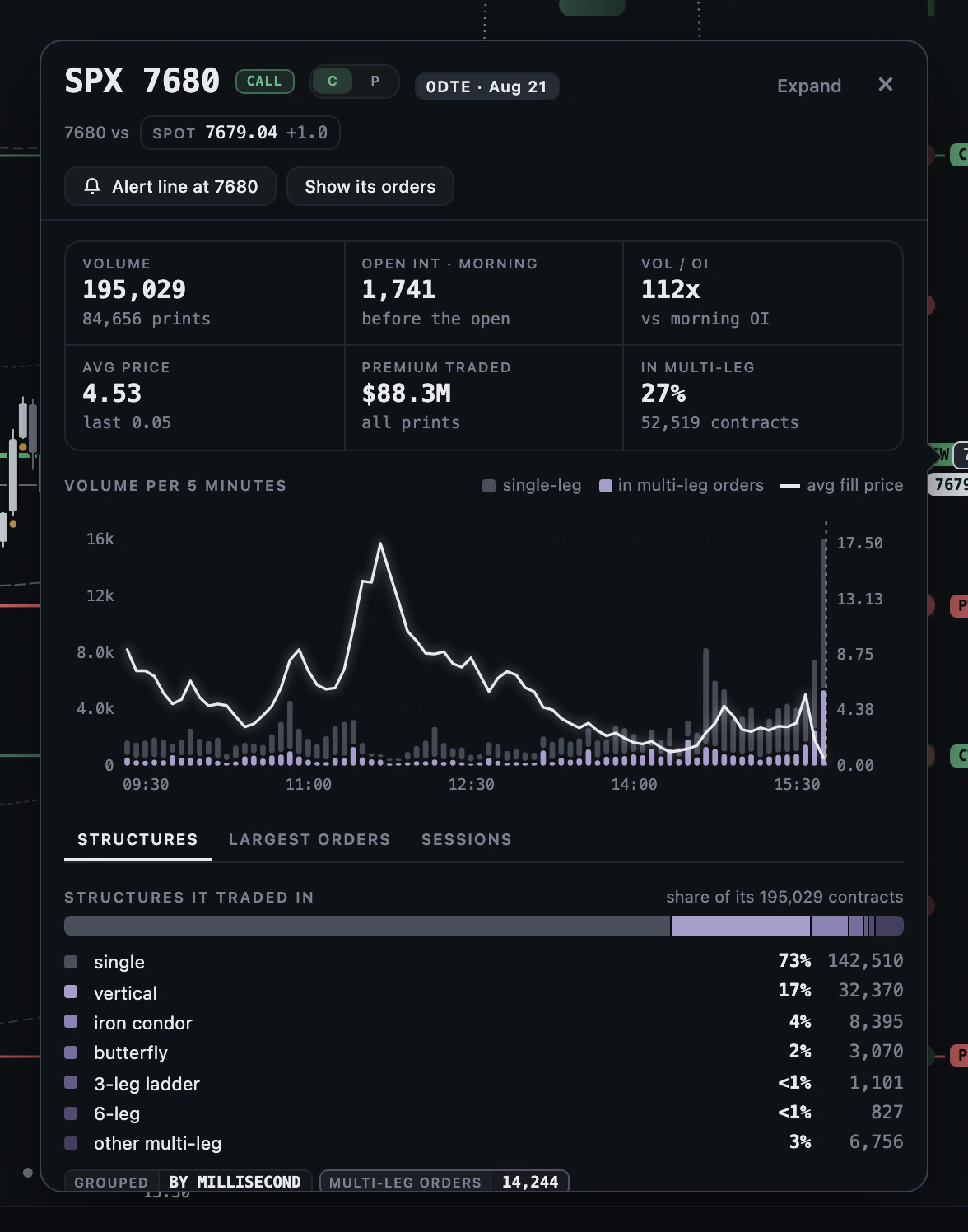
Why: one contract's day in one place: how much traded, when, at what average price, inside which structures, and in which large orders. Where: click a strike on the price scale, right-click a ladder row and pick Contract card, or click a board row or an order's leg.
How to use it
- Click a strike on the price scale: the card opens beside it as a popover. C and P switch the right.
- Read the numbers: volume and prints, morning open interest, Vol/OI, average price, premium traded and the share in multi-leg orders.
- Read VOLUME PER 5 MINUTES: single-leg and multi-leg bars with the average fill price as a line; hover a bar for its five minutes.
- Open the tabs: STRUCTURES, LARGEST ORDERS and SESSIONS.
- In LARGEST ORDERS, press the play button on a row to move the replay to that second.
- Press Expand for the drawer, one scrolling card over the chart's right edge beside ORDERS.
How to read it
- A high Vol/OI says the session's trading was large against the morning's positions; it does not say positions were opened.
- A large multi-leg share means the contract mostly traded as a leg; read the structure, not the leg.
- The average fill price line is a price, not a direction.
Settings and controls
| Control | What it does |
|---|---|
| C / P | The call or the put at the same strike |
| STRUCTURES | The shapes it traded in, as shares of its contracts |
| LARGEST ORDERS | The largest ledger orders that touched it, each with a button to the replay at that second |
| SESSIONS | Its last sessions: volume, open interest, change in open interest and last price |
| Expand | The card as a drawer beside ORDERS |
What it measures
Volume and prints are the session's; open interest is the morning count, before the open. Structures group multi-leg prints by the millisecond and name them by shape, as shares of the contract's volume. The change in open interest on SESSIONS is the next morning's count minus this one.
Limits
Nothing on the card names a side, or whether a position was opened or closed. A session's change in open interest is known the next morning.
Related
- ORDERS
- ORDERS: Contract boards
- ORDERS: Card actions: alert line and its orders
- ORDERS: The order ledger
- REPLAY: The playback bar
Questions
- Where does the contract card open from?
- A strike on the price scale, a ladder row's right-click menu, a row on the contract boards, or a leg in the order ledger.
- What is Vol/OI on the card?
- The session's volume over the open interest counted that morning, before the open.
- Does the card say which side the trading was on?
- No. The side of an SPX print is close to a coin flip against the exchange's own record, so the card counts volume, premium and open interest only.
- Can I jump to the moment an order printed?
- Yes. In LARGEST ORDERS each row has a play button that moves the replay cursor to that second.